Page 1 of 1
[SOLVED] Missing Permission in Manifest for Oracle Forms 10g
Posted: 02 Sep 2020, 18:07
by tofiquesoormo
Hi
I am able to launch the application but after loading Oracle Forms 10g is crashing using my JNLP file,
I am using Amazon Corretto 8 1.8.0_265 as my default Java JDK
any support will be highly appreciated
Re: Oracle Forms 10g is crashing while using JNLP
Posted: 03 Sep 2020, 06:50
by Janak Mulani
Hi,
Just to confirm : You are able to start your application jnlp with OWS but after starting your application crashes when it tries to load Oracle Forms 10G. Is this correct?
Please check the following:
- the logs in <User Home>/.config/icedtea-web/log directory to see if they indicate anything?
- Are all the necessary jar files for your app with oracle Forms specified in the jnlp file?
- Is the same application jnlp running with JWS?
- Janak
Re: Oracle Forms 10g is crashing while using JNLP
Posted: 03 Sep 2020, 13:06
by tofiquesoormo
Hi Janak
Thanks for the reply,
actually issue was MD5 Algorithm which was blocking and giving error on one of oracle jar file was not signed and
after removing MD5 algorithm from security settings, it worked.
Now I am still getting another warning message
"Application Webstart Test Oracle Forms 10g from
http://myserv:7778/forms/java/ is missing the permissions attribute, Applications without this
attribute should be trusted. "
Please advice how to avoid this warning ?
Below is my JNLP code
=================
<jnlp spec="1.0+" codebase="
http://myserv:7778/forms/java/">
<information>
<title>Webstart Test Oracle Forms 10g</title>
<vendor> test vendor </vendor>
<homepage href="null"/>
<description>Webstart Test Oracle Forms 10g</description>
</information>
<security>
<all-permissions/>
</security>
<update check="timeout" policy="always"/>
<resources>
<java version="1.8.0_265"/>
<jar href="frmall.jar" download="eager" main="true"/>
</resources>
<applet-desc name="Webstart Test Oracle Forms 10g" main-class="oracle.forms.engine.Main" width="990" height="660">
<param name="background" value="no"/>
<param name="logo" value="no"/>
<param name="serverApp" value="default"/>
<param name="lookAndFeel" value="oracle"/>
<param name="allow_debug" value="true"/>
<param name="separateFrame" value="false"/>
<param name="em_mode" value="1"/>
<param name="latencyCheck" value="true"/>
<param name="networkRetries" value="240"/>
<param name="serverArgs" value="module=test.fmx useSDI=yes"/>
<param name="serverURL" value="
http://myserv:7778/forms/lservlet?ifcfs ... nfig=jpi"/>
<param name="colorScheme" value="teal"/>
<param name="splashScreen" value="no"/>
<param name="dontTruncateTabs" value="true"/>
</applet-desc>
</jnlp>
Re: Oracle Forms 10g is crashing while using JNLP
Posted: 03 Sep 2020, 13:46
by Janak Mulani
Not only the jars should be signed by the same signature, their manifests should have the following attributes:
Permissions: all-permissions
Codebase: *
Application-Library-Allowable-Codebase: *
Re: Oracle Forms 10g is crashing while using JNLP
Posted: 03 Sep 2020, 14:18
by tofiquesoormo
if you don't mind , can you mention where these attributes to be updated in my JNLP code above ?
Re: Oracle Forms 10g is crashing while using JNLP
Posted: 03 Sep 2020, 14:25
by Janak Mulani
Not in jnlp, these should be in the manifest of the signed jar file.
Re: Oracle Forms 10g is crashing while using JNLP
Posted: 03 Sep 2020, 14:31
by tofiquesoormo
Ok instead of touching Oracle JAR, If I want to add the server in the exception list, how can we do in it in OWS ?
Re: Oracle Forms 10g is crashing while using JNLP
Posted: 07 Sep 2020, 13:02
by Janak Mulani
Is the Oracle Jar frmall.jar signed? Can you please send the screenshot of the dialog that is shown when you start the app and also the log files.
Thanks
Re: Oracle Forms 10g is crashing while using JNLP
Posted: 09 Sep 2020, 09:00
by Janak Mulani
If the Jar is signed but the
Permissions attribute is missing in the jar's manifest then you will get the following dialog:
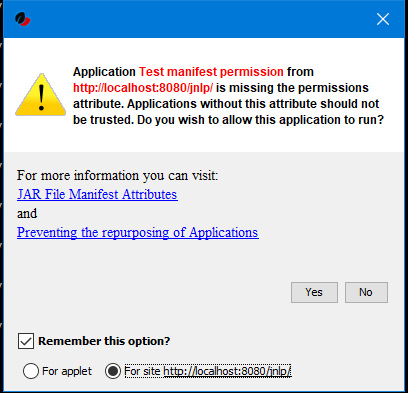
- MissingPermission.PNG (15.56 KiB) Viewed 26512 times
You can choose to
"Remember this option" for the site and Press the
Yes button. Your decision will be stored in the file
<User_HOME>/.config/icedtea-web\.appletTrustSettings. Next time when you start the jnlp you will not be shown the above dialog.
Alternatively, you can suppress the checking of selected or all manifest attributes by specifying the following property in your
deployment.properties file:
Code: Select all
deployment.manifest.attributes.check=NONE
Default value of this property is ALL.
Other values for this property are
PERMISSIONS, CODEBASE, TRUSTED, ALAC, ENTRYPOINT. You can specify a comma separated list these Manifest attributes to be checked by OWS. For example if you want all except Permissions attribute to be checked by OWS ManifestChecker then you could specify:
Code: Select all
deployment.manifest.attributes.check= CODEBASE,TRUSTED,ALAC,ENTRYPOINT
Re: [SOLVED] Missing Permission in Manifest for Oracle Forms 10g
Posted: 12 Dec 2025, 11:37
by chanteclair
Hi,
I have the same problem although the checking of all manifest attributes was add in the response.varfile file for deployment and, as result, this parameter is well writen in the deployment.properties file.
What is looking strange is if i canceled the code :
Code: Select all
deployment.manifest.attributes.check=NONE
in the deployment properties file, run my application, close it, add the code again in the deployment properties file, the popup does not appear anymore.
Do you have any idea how to ensure the code is executed correctly upon installation with the response.varfile file, without having to perform the above procedure on all user workstations to make the popup disappear?
Thanks for your answers.
Re: [SOLVED] Missing Permission in Manifest for Oracle Forms 10g
Posted: 16 Dec 2025, 12:07
by Janak Mulani
> checking of all manifest attributes was add in the response.varfile
What exactly did you specify in the response.varfile?
After installation did the property and value appear correctly in the deployment.properties file?
What do you mean by "cancelling the code"? Do you mean that you commented or deleted the property in the deployment.properties file as follows:
#deployment.manifest.attributes.check=NONE
You ran the app with OWS after commenting/deleting the property in deployment.properties file. In this case, the default value of the property is taken as ALL. Did you see the warning dialog?
After closing the app, you added or uncommented the property in the deployment.properties file. So your deployment.properties file had:
deployment.manifest.attributes.check=NONE
After this you ran the app with OWS and the warning popup did not appear => This is as expected because you suppressed the manifest attribute check by specifying deployment.manifest.attributes.check=NONE
Re: [SOLVED] Missing Permission in Manifest for Oracle Forms 10g
Posted: 16 Dec 2025, 14:02
by chanteclair
Janak Mulani wrote: 16 Dec 2025, 12:07
> checking of all manifest attributes was add in the response.varfile
What exactly did you specify in the
response.varfile?
Code: Select all
deployment.manifest.attributes.check=NONE
is specified in the response.varfile
After installation did the property and value appear correctly in the deployment.properties file? 1
Yes.
What do you mean by "cancelling the code"? Do you mean that you commented or deleted the property in the deployment.properties file as follows:
#deployment.manifest.attributes.check=NONE
The property is deleted in the user deployment.properties file
You ran the app with OWS after commenting/deleting the property in deployment.properties file. In this case, the default value of the property is taken as ALL. Did you see the warning dialog?
Yes, the property is deleted in the user deployment.properties file and the warning dialog appears.
After closing the app, you added or uncommented the property in the deployment.properties file. So your deployment.properties file had:
deployment.manifest.attributes.check=NONE
Yes it is
After this you ran the app with OWS and the warning popup did not appear => This is as expected because you suppressed the manifest attribute check by specifying deployment.manifest.attributes.check=NONE
Yes, but I don't understand why the warning dialog appears after item 1 in your answer as the deployment.properties is faithful to the reponse.varfile.
Why do i have to delete the property and add it again in the deployment.properties to make it works, but not immediately upon installation ?
Thanks.
Re: [SOLVED] Missing Permission in Manifest for Oracle Forms 10g
Posted: 17 Dec 2025, 07:24
by Janak Mulani
1. Your response.varfile has : deployment.manifest.attributes.check=NONE
2. You install OWS and deployment.properties file has deployment.manifest.attributes.check=NONE
3. You run the newly installed OWS on a Jnlp file which has a jar file WITHOUT manifest attributes and you see that Manifest Attributes Warning dialog even when you have deployment.manifest.attributes.check=NONE in the deployment.properties file.
So from what you describe deployment.manifest.attributes.check=NONE is not having any effect after installation. It has effect only after you delete it from deployment.properties, run OWS once, add it again to deployment.properties and run OWS. Is this sequence correct?
This sounds strange. I will try to reproduce it. However, would it be possible for you to send a logs of the OWS executions immediately after installation, execution after deleting the property and execution after adding the property back. Also, please clean the OWS cache before each run.
Re: [SOLVED] Missing Permission in Manifest for Oracle Forms 10g
Posted: 17 Dec 2025, 07:52
by chanteclair
Hello,
So from what you describe deployment.manifest.attributes.check=NONE is not having any effect after installation. It has effect only after you delete it from deployment.properties, run OWS once, add it again to deployment.properties and run OWS. Is this sequence correct?
Yes it is.
I will try to get all the logs to send it. It may take a few time.
Thx.
Re: [SOLVED] Missing Permission in Manifest for Oracle Forms 10g
Posted: 08 Jan 2026, 13:59
by chanteclair
I did a new installation, with the same parameters in the response.varfile.
This time, after a popup for the certificate and one more for the jarfile at the first start, all is right. No more popup later.
Thanks for your time.
Re: [SOLVED] Missing Permission in Manifest for Oracle Forms 10g
Posted: 09 Jan 2026, 12:56
by Janak Mulani
Thanks for the feedback
Re: [SOLVED] Missing Permission in Manifest for Oracle Forms 10g
Posted: 09 Jan 2026, 13:16
by chanteclair
Hello,
Finally, after restarting the PC, the behavior remains the same... So I uninstalled everything and cleaned the registry. I'll reinstall next week, test everything again, and I'll post the logs if this strange behavior continues.
Regards.